When A Single CDN Becomes A Point Of Failure: Signs It’s Time To Switch
Learn the warning signs of single CDN failure and how to build resilient delivery with monitoring, redundancy, and failover plans.

.webp)
You are in the middle of a normal day. Orders look steady. Dashboards look calm. Then messages start. Customers say, “Login spins forever.” Support says, “The ticket page will not load.”
You check your servers. Healthy. You check your database. Healthy. You check your load balancer. Healthy. You check your cloud region. Healthy.
Yet your business still feels blocked.
That gap usually means one thing: the path between your users and your origin has broken. When you rely on one edge vendor for every request, one incident can cut off everything. That is what a single CDN failure looks like. Your internal redundancy can be perfect, but your users still face a locked front door.
You need signals and a plan. Below are the warning signs, plus a clear path toward safer delivery.
Why A Single CDN Can Break Everything
A modern CDN does much more than cache images. Many CDNs also handle DNS, TLS, routing rules, bot filtering, and WAF controls. Some teams even run small bits of code at the edge for redirects, headers, access checks, and small rewrites.
When you send all traffic through one provider, you create a single point of failure CDN. A vendor outage, a bad configuration push, a peering issue with a major ISP, or a regional capacity squeeze can block users across many regions at the same time.
Think of the CDN as your storefront door.
- Your origin can run across multiple zones and regions.
- Your storefront can still go dark when one delivery layer sits in front of everything.
Once you see that shape, the next question is simple: are you seeing early cracks?
{{promo}}
The Performance Signals You Cannot Ignore
Most teams notice a full outage. The harder part is spotting the slow decline before the big event. You can catch that decline with a few metrics.
Tail Latency Tells You What Your Real Users Feel
Average latency hides pain. You care about the slow users, not only the typical user.
Watch four numbers:
- P50, the median experience
- P95, the slowest 5 percent
- P99, the slowest 1 percent
- Time to first byte, how fast the first response starts
What should raise concern?
- P95 stays above roughly 400 ms on key pages
- P99 stays above roughly 800 ms on key pages
- Time to first byte keeps rising in a revenue region
Why this matters: the slow tail often holds mobile users and users on congested ISP paths. Those users still buy, still sign up, and still leave when pages feel heavy.
Common causes when you rely on one provider:
- Congestion between the CDN and a large ISP
- Weak edge presence in a region where your audience grew
- Overloaded edge nodes during peak hours
- Too much edge logic causing slow starts
When you see chronic tail pain, one network might no longer fit your traffic shape.
Cache Hit Ratio Shows Whether Your CDN Is Doing Real Work
A CDN earns value when requests are served from cache. When cache hit ratio falls, more requests go to origin. Users wait longer and your origin carries more load.
Watch for:
- Cache hit ratio below 80 percent for mixed traffic
- Cache hit ratio below 60 percent for content you expected to cache
- Origin CPU and origin bandwidth rising faster than user growth
- Cloud egress costs rising without a clear business reason
A low cache hit ratio also sets up a second risk: the thundering herd. If the edge cache clears, or if the edge layer has trouble, your origin can get slammed by requests that used to be served close to users. Your origin can fail right after the CDN recovers.
This is one reason teams invest in CDN redundancy. You want more than one layer that can absorb demand.
Error Patterns Reveal Regional Weakness
A few client errors happen in any product. The bigger concern is server errors and timeouts that come in waves.
Watch for:
- 5xx errors that sit above about 0.1 percent for long windows
- Spikes that only show up in one country or one metro area
- Sudden bursts of 429 rate limits you did not intend
- Retry storms from apps after slow responses
One more point: vendor dashboards often show a global summary. Your users live in local networks. Use independent monitoring and real user monitoring so you can see regional pain clearly.
Peak Traffic Should Feel Like A Wave, Not A Ceiling
If your business runs launches and flash sales, peak traffic is normal. The warning sign is a ceiling that shows up at the same hours, week after week.
Look for:
- Video start time rising during peak demand
- Big downloads slowing at peak hours
- Streaming quality dropping more often on good networks
- Throughput flatlining while demand climbs
A single provider can hit capacity limits in specific places. Global capacity may look huge, yet one region can still suffer.
Your Business Signals Matter Just As Much
Even when performance looks “fine,” daily friction can tell you the edge layer is holding you back.
Your Audience Moved, But Your CDN Footprint Stayed The Same
No CDN wins everywhere. A provider can be strong in North America, Europe, Asia Pacific, or South America.
You will notice a geography gap when:
- Round trip time stays above 100 ms in a market that should be close
- TLS handshakes feel slow on secure flows
- Synthetic tests look fine, but real user data looks worse
- Complaints cluster by country or by ISP
If you keep growing into new markets, you may need more than one network to stay fast.
Change Speed And Observability Are Part Of Reliability
During an incident, the ability to change rules fast is a survival skill.
Warning signs:
- Purges take minutes instead of seconds
- Rule changes take a long time to propagate
- Rollbacks are slow or manual
- Logs arrive in delayed batches, not in real time
Slow tools turn small issues into long incidents. You lose time, and your users pay the price.
{{promo}}
Security Can Cause Downtime, And Downtime Can Cause Security Gaps
A single edge platform also creates shared fate. Thousands of customers share core engines for WAF and bot control. A bad rule update can block good traffic for many customers at once.
Signals that you need more control:
- You cannot ship a new rate limit rule quickly
- Bot control feels weak for login and search flows
- You cannot express custom firewall logic cleanly
- Certificate handling feels opaque or fragile
CDN choice affects availability because security sits on the same edge path.
Contract Friction Can Push You Into Unsafe Choices
A lot of technical risk starts in pricing and support.
Red flags include:
- Overage pricing that makes traffic spikes scary
- Billing that is hard to forecast
- Core features locked behind “premium” tiers
- Support responses that take a full day for urgent issues
When cost fear or slow support shapes your incident response, your delivery layer has become a business risk.
A Quick “Switch” Scorecard
You do not need a perfect formula. You need a sane way to decide.
If you see several items below, switching or adding a second provider becomes reasonable.
- Tail latency stays high in a revenue region
Why: slow users abandon sessions and stop trusting the product.
Next: test a second network in that region. - Cache hit ratio keeps falling
Why: more origin load, higher cost, higher outage risk.
Next: audit cache keys and add a shield layer. - Regional 5xx spikes
Why: local edge instability or weak peering.
Next: add independent monitoring and prepare failover. - Peak traffic hits a ceiling
Why: capacity limits in a specific market.
Next: split load across providers during peaks. - Slow config and delayed logs
Why: longer incidents and slower fixes.
Next: move to API driven control and real time logs. - Lock in and support decline
Why: hard to leave, hard to recover fast.
Next: plan migration work and renegotiate terms.
What To Do Instead Of Betting On One Vendor
The goal is not “more vendors.” The goal is control and resilience.
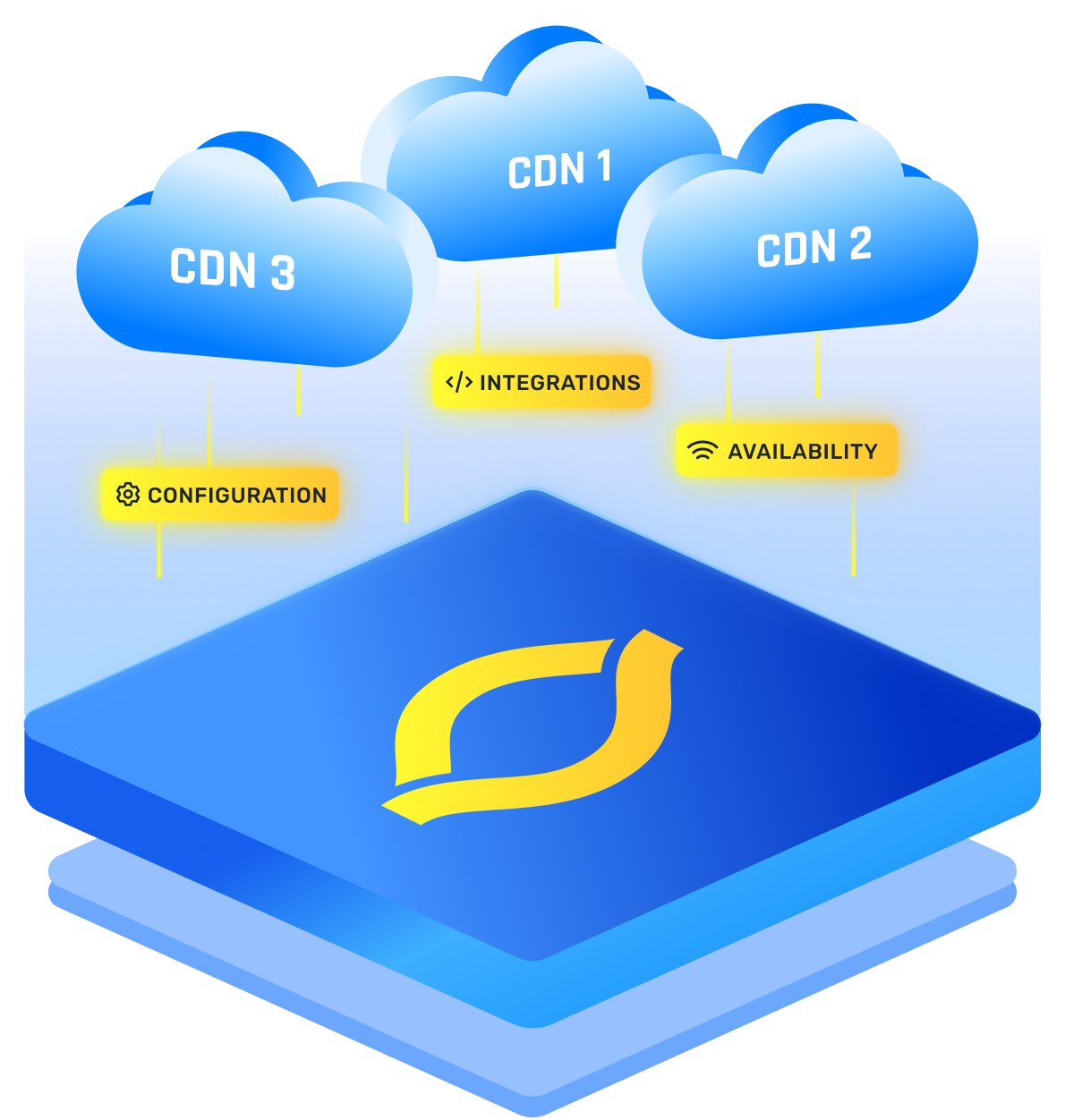
A multi CDN strategy gives you two strong outcomes.
- You can shift traffic when one network has trouble
- You can route users to the network that performs best in their region
That design is CDN redundancy in plain language. Your storefront has more than one door.
Many teams call this a high availability CDN setup, because the edge layer no longer depends on one provider.
Two Common Patterns That Keep Operations Sane
You do not need four CDNs. Two is often enough to remove the biggest risk.
Pattern 1: Active traffic on both CDNs
Both CDNs serve real users all the time. You can split by geography, by content type, or by cost goals.
Why this helps: both paths stay warm, so failover is not a surprise.
Pattern 2: Primary plus warm standby
One CDN handles most traffic. The second CDN stays ready, caches key objects, and keeps certificates active.
Why this helps: simpler daily operations, while still removing the “total lockout” risk.
Both patterns can work. The right choice depends on team size and how often you change edge rules.
Protect Your Origin With An Origin Shield
With two CDNs, you might worry about more origin traffic. An origin shield solves this.
An origin shield is a shared cache layer closer to origin. Both CDNs fetch from the shield, not from origin. The shield cuts duplicate origin fetches and reduces cloud egress.
Rollout Plan
Below is a five step plan you can run without drama. This is where you turn the idea into a working CDN failover strategy, without switching everything in one day.
Step 1: List Every Edge Feature You Rely On
Write down what your current CDN handles.
- DNS and traffic steering
- TLS certificates and redirects
- Cache rules and purge workflows
- WAF rules, bot rules, and rate limits
- Edge code such as header rewrites or access checks
This list prevents surprises. You can now see what must move and what can be removed. You also see what needs rebuild work.
Step 2: Pick A Second Provider That Covers Your Weak Spots
Choose a provider with strengths where your current provider is weaker.
Evaluate:
- Performance in your top markets
- Modern protocol support, such as HTTP 3
- Rule control for WAF and rate limiting
- Real time log streaming for incident response
You are buying a second path, so difference is a benefit.
Step 3: Build Traffic Steering That Can Move Fast
DNS steering is simple, but DNS caches. Fast reaction needs a steering layer you trust.
Options you can use:
- Weighted DNS with short TTL where possible
- A traffic director that ingests health checks and user signals
- App level routing for selected assets, such as images
- A manual emergency switch backed by clear runbooks
This steering layer decides how quickly users escape a broken path.
Step 4: Canary Traffic And Measure More Than Uptime
Start with a small slice, then ramp.
Track:
- P95 and P99 latency on key flows
- Cache hit ratio and origin load
- Error rates by country
- Conversion and bounce changes in your funnel
A canary phase will also expose rule mismatches. Fix those mismatches before you scale.
Step 5: Practice Failure On Purpose
Resilience comes from practice, not hope.
Run game days. Simulate a provider outage. Switch traffic. Watch what breaks. Fix the weak points. Repeat on a schedule.
Also keep parity work ongoing.
- Keep security rules aligned across providers
- Keep certificates renewed in both places
- Keep purge workflows tested
- Keep logs flowing into one shared dashboard
{{promo}}
Conclusion
A CDN should make your product faster and safer. When you route everything through one edge vendor, you also accept one shared fate. A vendor outage or a bad rule can block every user, even when your servers look healthy.
The fix does not need a huge rebuild. Add a second path. Measure tail latency. Keep caching healthy. Practice switching traffic.
Once you do that, your storefront stops being fragile. Your users keep moving, and your team keeps control.
FAQs
What Is A Single Point Of Failure CDN?
A single point of failure CDN is when one CDN provider sits in front of everything you serve, so a vendor outage, routing issue, or bad config can take your whole site or app offline even if your origin is healthy.
How Do I Know If I’m Experiencing A Single CDN Failure?
You will often see healthy origin metrics but users cannot load pages. In monitoring, you will usually notice spikes in timeouts, 5xx errors, and tail latency, often clustered by region or ISP, while your backend services still look normal.
What Is The Simplest Way To Add CDN Redundancy?
Start with a second CDN as a warm standby. Keep certificates active, cache key routes warmed, and set up weighted DNS so you can move traffic quickly if your primary CDN degrades.
How Fast Can A CDN Failover Strategy React?
DNS based failover depends on TTL and user caching, so response can take minutes. Faster approaches use traffic directors, health checks, and real user signals to shift traffic more quickly, sometimes close to real time for new sessions.
Is A Multi CDN Strategy Only For Huge Companies?
No. If downtime costs you serious revenue, if you sell globally, or if you have frequent launches and spikes, a multi CDN strategy can pay for itself even at mid market scale, because it reduces outage risk and lets you route users to the best performing network.